|
Logistix Workflow.COM
was built on years of experience and implementations in
the workflow industry. The workflow segment lacks a
truly flexible integration layer that provides API's
intended to allow write once deploy many capability.
This allows application vendors
to develop workflow features within their products and
deploy on industry standard workflow engines or the
Logistix workflow services. How many times has your
customer said "We already use
Staffware why do I need another workflow engine ?".
Let us worry about keeping you up to date in the
workflow industry you write your applications.
Logistix Workflow.COM uses
the power of Microsoft Transaction Server or COM+ to
deliver workflow services that are stateless, load
balancing and transaction aware. The web based
architecture of our integration services makes
Staffware, Plexus Floware or Filenet engines
suitable for the Web Based Integation. Wether you are
developing web based or rich clients the n-Tier and
HTTP/SOAP architecture provides maximum flexibility.
- N-Tier Stateless business
objects
- HTTP/SOAP compatible
libraries
- Use the power of Staffware,
Plexus Floware, Filenet or our own Logistix
Engine.
- Single integration Layer for
all engines
- Reduced workflow licences
required using resource dispenser architecture
typically 3:1 or higher.
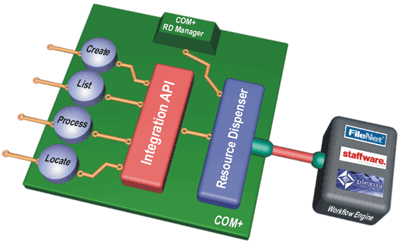
Built as
Stateless business objects that address a core Resource
Dispenser the integration library has the best power,
functionality and price ratio in the industry. The four
key business objects
- Work Create
- Create work flow cases with
business variables
- Configurable to start one
or many workflows based on case type.
- Unique case ID concept for
subsequent case tracking
- Work Lists
- Generate Views of work
items
- "Work Tray" concept allows
consolidation of views
- List criteria, based on
many attributes including Deadline Dates, Priority,
Variable Values
- Work Process
- Checkout work items
- Set / Update workflow
variables
- Process via "rule engines"
or Decisions
- Suspend or return items
- Work Locate
- Locate Work using the
Logistix Unique case id or the workflow engine id
- View and process the
Logistix extensible audit trail
|