| Skelta Workflow.NET Help |
| Developing and Configuring the Custom Document View
|
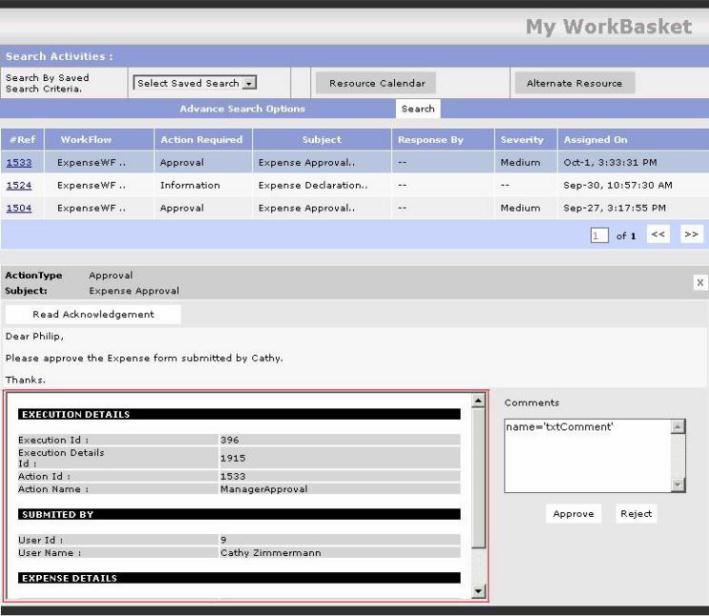
The Custom Document View is used to display
application specific details to the resource in the activity list. In the image
given below the document view is marked as red. Custom document view has to be
configured in the WorkflowNET.Config.xml file, using the tag,
<documentwebviewcontrol
							class="Workflow.NET.Web.ActivityDocumentDetails.DocumentDetailsControl"
							assembly="D:\Program

							   Files\Skelta\Workflow.NET\bin\Workflow.NET.Web.ActivityDocumentDetails.dll"
							param=""/>
|
A sample code for developing a custom document view is
given below.
public class DocumentDetailsControl :
							WebControl,Workflow.NET.Interfaces.IActivityWebUIHandler

							   {


							      private ActivityContext
							CurrentActivityContext;

							      private string Parameter;


							      // Contructor

							      public DocumentDetailsControl()

							      {


							      }

							      // Contructor with parameter

							      public DocumentDetailsControl( string
							Parameter )

							      {

							            this.Parameter
							= Parameter;

							      }


							      // Initialize

							      protected override void
							OnInit(System.EventArgs e)

							      {


							      }


							      // Context Object

							      public void SetContext(ActivityContext
							ActContext)

							      {

							            CurrentActivityContext
							= ActContext;

							      }


							      // Displays the details of the activity and
							the data submitted by the user to the engine

							      protected override void
							Render(HtmlTextWriter htw)

							      {

							            Context.Response.Clear();

							            if(
							!CommonFunctions.IsEmpty(Parameter) )

							                  htw.Write("<B>Parameter
							Passed:</B>" + Parameter + "<BR>");


							            htw.Write("<FONT
							FACE=VERDANA SIZE=1>");


							            htw.Write("<BR><B>Execution
							Id:</B>" + CurrentActivityContext.ExecutionId);

							            htw.Write("<BR><B>Execution
							Details Id:</B>" + CurrentActivityContext.ExecutionDetailsId);


							            htw.Write("<BR><B>Activity
							Id:</B>" + CurrentActivityContext.ActivityId);


							            htw.Write("<BR><B>Action:</B>"
							+ CurrentActivityContext.CurrentAction.Name);

							            htw.Write("<BR><B>Data
							Submitted:</B><BR>");

							            htw.Write("<TEXTAREA
							COLS=40 ROWS=10>" + CurrentActivityContext.WorkflowContext.Data +
							"</TEXTAREA>");

							            htw.Write("</FONT>");

							            base.Render(htw);

							            Context.Response.End();

							      }

} |