| Skelta Workflow.NET Help |
| Customizing the Activity Detail View |
The Activity Detail View is used
to display the detailed view of the selected activity in the the resource's
activity list. The appearance of the Activity Detail View can be changed to
create a Custom Activity Detail View.
You can change the appearance of the the Activity
Detail View in two ways –
-
One method is to make changes directly in the HTML code to effect changes to
the font size and color, background color, position of the controls etc., to
give the View a new look and feel.
-
The second method is to modify the style sheet by adding new classes with the
desired styles and referencing the classes in the HTML code.
The image shown here is the Activity Detail View
for an Expense Approval Request.
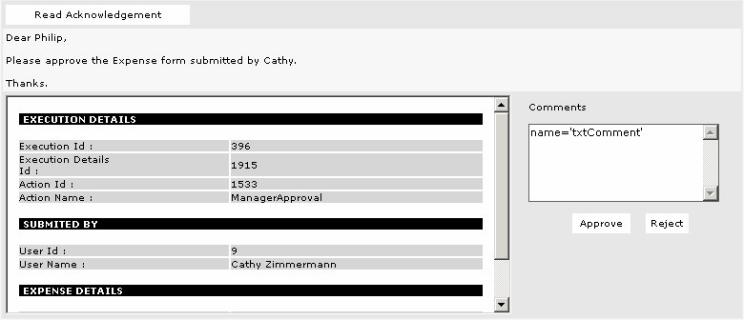
In the HTML code for the
Activity Detail View, 'placeholders' are used in place of the actual values,
which will be dynamically substituted during run time. The 'placeholders' can
be identified by the syntax <%#placeholdername%>. In the following
example, there are two 'placeholders', <%#framename%> and
<%#DocumentWindow%> –
<IFRAME name="<%#framename%>" src="<%#DocumentWindow%>"
width="530" height="230" Border="0">.
The 'placeholders' have to be
retained when developing a Custom Activity Detail View by changing the HTML.
Sample HTML code with the 'placeholders' and with the actual values substituted
are shown below.
|
The HTML for the view in the image is given here:
|
<TABLE WIDTH="100%" BORDER="0" CELLSPACING="1"
							CELLPADDING="3" ID="Table2">

							  <TR>

							    <TD WIDTH="70%">

							      <B><INPUT TYPE='SUBMIT'
							VALUE='Read Acknowledgement' name='<%#Acknowledge%>' class="button2"
							ID="Submit1"></td>


							    <TD WIDTH="30%">& nbsp;</TD>

							  </TR>

							  <TR CLASS="N-ListBGCOLORCOL2">

							    <TD colspan=3>

							      <%#Notes%>

							    </TD>

							  </TR>

							  <TR VALIGN="TOP" CLASS="RUNTEXT1">

							      <TD>

							        <IFRAME
							name="<%#framename%>" src="<%#DocumentWindow%>" width="530"
							height="230" Border="0">

							        </IFRAME>

							      </TD>

							      <TD>

							          <TABLE
							WIDTH="100%" BORDER="0" CELLSPACING="1" CELLPADDING="5" ID="Table3">

							              <TR
							CLASS="RUNTEXT1">

							                  <TD
							align=left>

							                      Comments

							                  </TD>

							              </TR>

							              <TR>

							                  <TD
							align=left>

							                  <TEXTAREA
							cols=30 rows=6 wrap="VIRTUAL" class="input1" ID="Textarea1"
							NAME="Textarea1">name="<%#Comment%>"</TEXTAREA>

							                  </TD>

							              </TR>

							              <TR>

							                  <TD
							align=center>

							                      <INPUT
							TYPE='SUBMIT' VALUE='Approve' name="<%#Approve%>" class=button2
							ID="Submit1">

							                      <INPUT
							TYPE='SUBMIT' VALUE='Reject' name="<%#Reject%>" class=button2
							ID="Submit2">

							                  </TD>

							              </TR>

							          </TABLE>

							      </TD>

							  </TR>

</TABLE> |
|
The HTML is shown below with the actual values in place of all the
placeholders:
|
<TABLE WIDTH="100%" BORDER="0" CELLSPACING="1"
							CELLPADDING="3" ID="Table2">

							  <TR>

							    <TD WIDTH="70%">

							      <B><INPUT TYPE='SUBMIT'
							VALUE='Read Acknowledgement' name='btnAcknowledge' class="button2"
							ID="Submit1"></td>


							    <TD WIDTH="30%">& nbsp;</TD>

							  </TR>

							  <TR CLASS="N-ListBGCOLORCOL2">

							    <TD colspan=3>

							      Dear Philip,<BR>

							      <BR>Please approve the Expense form
							submitted by Cathy.<BR>

							      <BR>Thanks.

							    </TD>

							  </TR>

							  <TR VALIGN="TOP" CLASS="RUNTEXT1">

							      <TD>

							        <IFRAME name="documentframe"
							src="?Displaytype=Documentview&ActivityId=1533" width="530" height="230"
							Border="0">

							        </IFRAME>

							      </TD>

							      <TD>

							          <TABLE
							WIDTH="100%" BORDER="0" CELLSPACING="1" CELLPADDING="5" ID="Table3">

							              <TR
							CLASS="RUNTEXT1">

							                  <TD
							align=left>

							                      Comments

							                  </TD>

							              </TR>

							              <TR>

							                  <TD
							align=left>

							                  <TEXTAREA
							cols=30 rows=6 wrap="VIRTUAL" class="input1" ID="Textarea1"
							NAME="Textarea1">name='txtComment'</TEXTAREA>

							                  </TD>

							              </TR>

							              <TR>

							                  <TD
							align=center>

							                      <INPUT
							TYPE='SUBMIT' VALUE='Approve' name="btnApprove" class="button2"
							ID="Submit1">

							                      <INPUT
							TYPE='SUBMIT' VALUE='Reject' name="btnReject" class="button2" ID="Submit2">

							                  </TD>

							              </TR>

							          </TABLE>

							      </TD>

							  </TR>

							</TABLE>
|