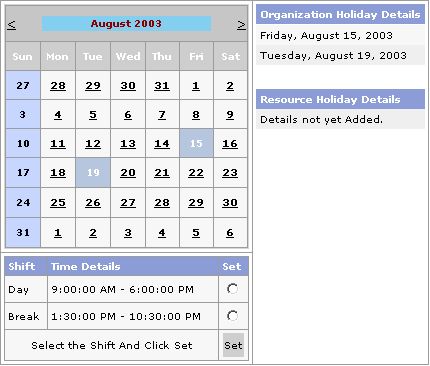
The Skelta Workflow.NET Resource Calendar web form is the user interface where the holidays and shifts of a resource can be specified. The Resource Calendar will also show the Organization Holidays and Shift details, which it will inherit. The Organization Holidays are shown under the Organization Holiday Details heading. The Resource Calendar screen opens when the resource clicks on the Resource Calendar button at the top of his/her activity list.
The Resource Calendar user interface has three main elements –
These are described in separate sections. The Resource Calendar screen is shown here with two organization holidays selected for the month of August.
Resource Calendar
The Calendar displays a monthly calendar with provision to go to the previous and the following month. The calendar will be used to add/remove the resource holidays as well as to view the selected Organization Holidays and Resource Holidays.
This list shows the resource holidays (other than weekly holidays) selected for the month. To specify the resource holidays, click on the required date on the calendar. The selected date(s) is highlighted in yellow on the calendar and also listed under the Resource Holiday Details heading. You can remove the selection by clicking on the highlighted date.
The Resource Shift Selection area shows all the shifts selected for the organization with a radio button for each. To select a shift, click on the radio button against the desired shift and then click the Set button.