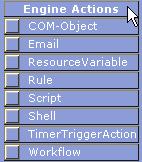
Engine Actions Menu
The Engine Actions tool opens a menu with eight options, which are described here. These actions are performed by the Workflow Engine without directly involving or affecting resources.
The Engine Action menu lists eight actions –

The COM-Object action can be used in a workflow to run a COM Object.

The Email action can be used in a workflow to send Email to a resource(s).

The ResourceVariable action can be used in a workflow to set the resource(s) who will execute the next step dynamically during the execution of the workflow. This action is similar to the ResourceSet action in Resource Actions, with the difference that here the engine sets the resources.

The Rule action can be used in a workflow to create complex expressions whose result will be 'True' or 'False'. Depending on the result the engine decides the path of the workflow.

The Script action can be used in a workflow to run Javascript or VBScript scripts.

The Shell action can be used in a workflow to execute shell commands (batch or executable files). The output of the Shell action could be used to determine the path of the workflow.
The TimerTriggerAction can be used in a workflow to trigger an action after the specified time. This can be used to introduce a delay in the workflow.

The Workflow action can be used in a workflow to run another workflow.