 ,
which can be found before each row in the report with a sublevel. When the next
level is expanded the icon changes to the collapse icon-
,
which can be found before each row in the report with a sublevel. When the next
level is expanded the icon changes to the collapse icon-  .
Clicking this will close the sublevel.
.
Clicking this will close the sublevel.
The Detailed Report screen has the header fields at the top showing general
information like Application Name, Workflow Name and Report Type.
The Report table is located below the header. The report has three levels with
the first level displayed by default. It has the following columns – Application,
Workflow, Submitted By, InternalStatus, Version, Executed
Date Time and Graphical View. The Graphical View column
has the View link which opens the Graphical View
of Workflow Execution screen. The next levels can be viewed by clicking
on the expand icon- ,
which can be found before each row in the report with a sublevel. When the next
level is expanded the icon changes to the collapse icon- .
Clicking this will close the sublevel.
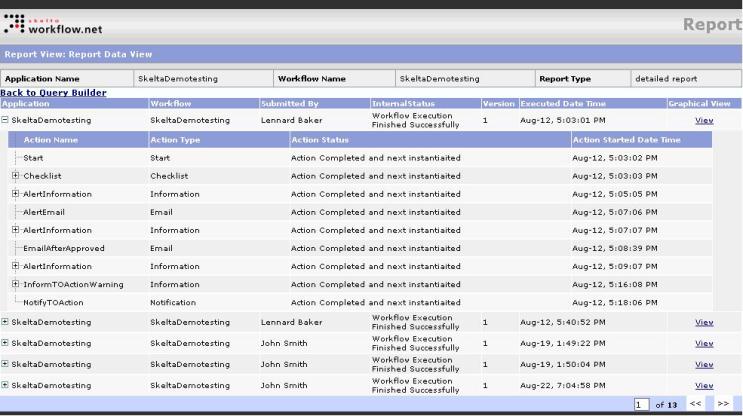
Detailed Report Screen
The second level shown expanded in the image below has the following columns – Action Name, Action Type, Action Status, and Graphical View. The third level also shown in the image below has the following columns – ActivityId, Assigned To, Activity Status, and Resource Output.
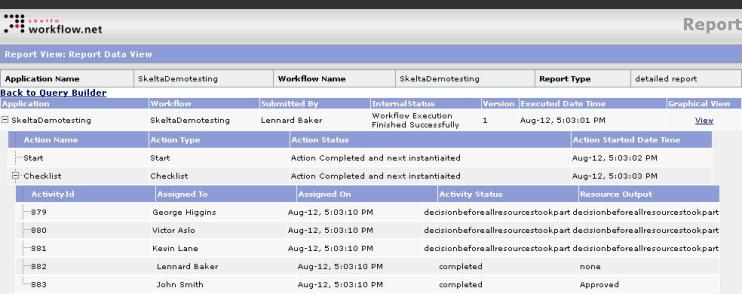
Detailed Report Screen - Second and Third level expanded
The Detailed Report screen has the << (to move backward) and >> (to move forward) buttons to move between the pages of a multipage report. The Back to Query Builder link closes the Detailed Report screen and returns to the Query Builder screen.